Example 1: Matrix multiplication (Single function)
In this section, we’ll explore the end-to-end workflow of RealProbe with a Vitis HLS project that implements a basic matrix multiplication kernel. This example is from Kastner et al.’s excellent Parallel Programming for FPGAs github repository. The tutorial example setup includes HLS source files (matrixmultiplication.cpp), testbench files (matrixmultiplication-top.cpp), and data files (matrixmultiplication.gold.dat), along with a pre-configured hls.tcl script.
Preparing Vitis HLS tcl Script
Vitis HLS can be operated through the GUI or via a batch-mode Tcl script. Below is a breakdown of the hls.tcl script structure, crucial for RealProbe as it reads solution_name, project_name, and target_device for future bitstream generation:
Define Variables
set solution_name solution1
set project_name project
set target_device {xc7z020clg400-1}
Setup Project
open_project -reset $project_name
add_files matrixmultiplication.cpp
add_files -tb matrixmultiplication-top.cpp
add_files -tb matrixmultiplication.gold.dat
set_top matrixmul
open_solution -reset $solution_name
set_part $target_device
create_clock -period 10 -name default
Run Simulations and Synthesis
csim_design -code_analyzer -clean
csynth_design
export_design -format ip_catalog
cosim_design -trace_level all
close_project
Note
Ensure that the variable names for solution_name, project_name, and target_device remain unchanged. The Tcl script name must also be kept as hls.tcl
Run RealProbe
To integrate RealProbe and override the default Vitis HLS functions, execute the following command:
make realprobe
Deploy on FPGA
Post RealProbe execution, a directory named FPGA will be generated within your project directory containing all necessary files for on-board execution. This includes an automatically generated Jupyter Notebook file (excluding software implementation for functional verification but incorporating RealProbe results).
On the Synestia Pynq-Z2 FPGA Jupyter server, navigate to the FPGA directory in the project folder (accessible via both Synestia desktop and Pynq-Z2 board) and execute the commands in the notebook using Shift + Enter.
RealProbe Output Results
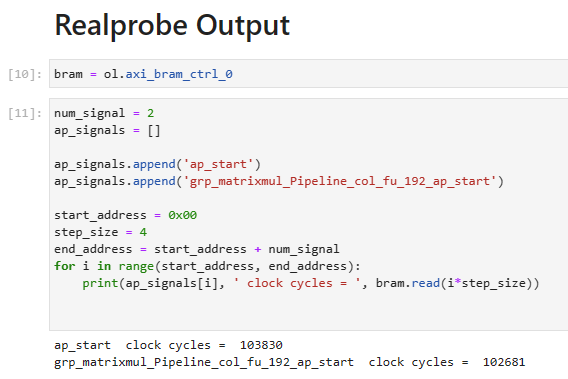
When running the RealProbe output section in the notebook, you’ll observe the results as shown below:
Compare with Co-sim results
RealProbe recorded a total of 103,830 cycles for the operation. To contrast, let’s review the Co-simulation results, which do not provide internal cycle counts but do report total latency for the top module. Refer to the report found at $project_name/$solution_name/sim/report/$topmodule_name_cosim.rpt, showing 50,842 clock cycles.

This discrepancy highlights a -104.2% difference between the Co-simulation and actual on-FPGA results, emphasizing the importance of RealProbe in understanding true FPGA performance.
Note
Even though Co-simulation does not provide cycle counts per module, its waveform can be examined for detailed timing analysis. Below is a waveform snapshot from this matrix multiplication example, marked with the start and end of the top function. Using the set 10ns clock cycle, the timing is calculated, resulting in a close approximation to the reported cycle count.

- alt:
<RealProbe Output>